Authorised Konica Minolta dealer in Randburg, Johannesburg

Request a quote Call us
bizhub B5020i

bizhub B5020i

KM Connect South Africa

Bizhub B5020i Konica Minolta Black & White Multifunctional Printers

bizhub B5020i

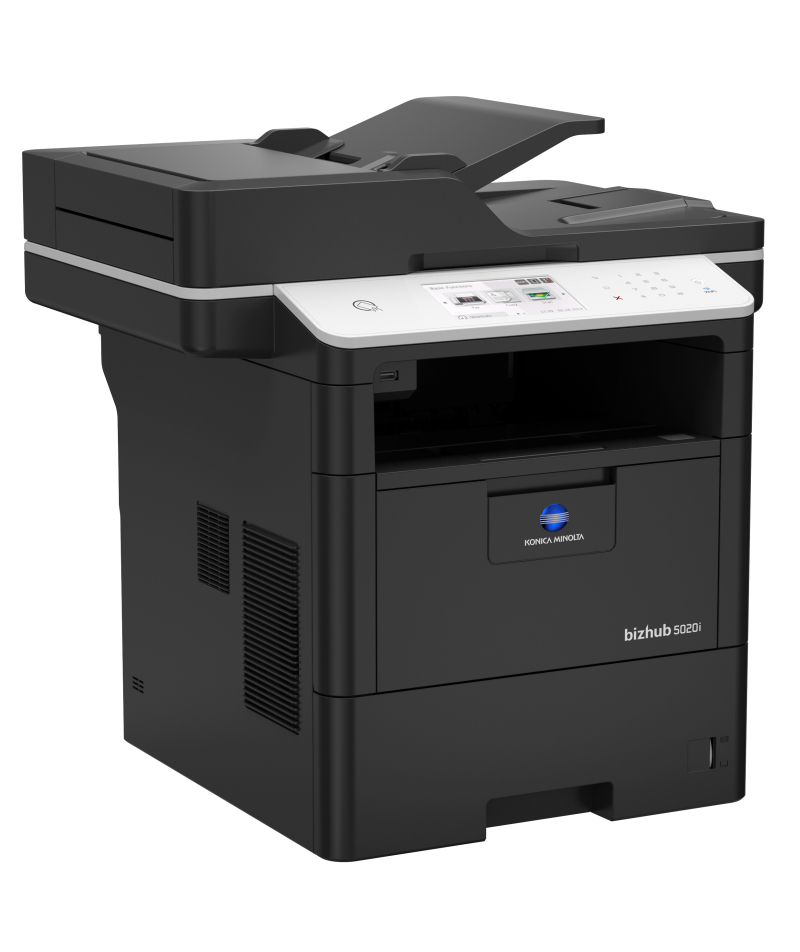
The bizhub B5020i is the South African name for Konica Minolta’s bizhub 5020i: a compact A4 black and white multifunctional that prints and copies at up to 50 pages a minute, scans both sides in one pass through an 80-sheet feeder and has fax as standard. It runs from a 4.85 inch colour touch panel, connects over Wi-Fi and is rated for 10,000 pages a month.

  • 50 ppm
  • A4 mono MFP
  • 80-sheet dual scan ADF
  • 100 ipm duplex scanning
  • 4.85″ touch panel
  • Fax standard
  • Up to 1,610 sheets
  • Wi-Fi standard
  • 20,000-page toner
  • 10,000 pages/month rec.
bizhub B5020i
bizhub B5020i
Key Features
  • 50 ppm A4 mono printing and copying, with automatic duplex at up to 24 ppm
  • 80-sheet dual scan document feeder scans both sides in one pass at up to 100 ipm mono and 34 ipm colour
  • Copy, print, colour scan and Super G3 fax as standard in one desktop-size unit
  • 4.85 inch colour touch panel
  • 520-sheet tray plus 50-sheet bypass as standard, expandable to 1,610 sheets with PF-P23 and PF-P24 trays
  • Wi-Fi, Gigabit Ethernet and USB 2.0 built in, with Wi-Fi Direct and mobile printing apps
  • PCL 6, PostScript 3 and XPS as standard
  • Scan to e-mail, FTP and USB, with Scan-to-Me and Scan-to-Home via Active Directory
  • Rated for 10,000 pages a month recommended and up to 150,000 pages maximum
  • Toner rated for up to 20,000 pages and an imaging unit for up to 50,000 pages
Functionalities

Print

  • Mobile printing Print directly from phones and tablets via Mopria, Konica Minolta Print Service and Konica Minolta Mobile Print, or over Wi-Fi Direct
  • Print from USB Prints DOCX, PPTX, PDF, JPEG, PNG and TIFF files from a USB stick via the front port
  • MyTab Customisable tab in the print driver for frequently used settings
  • Quiet mode Reduces printing noise for desktop placement
  • Eco mode Optimises printer settings for lower energy, paper and toner consumption

Copy

  • Card shot Copies the front and back of an ID card or passport onto one page
  • Copy features Duplex, 2-in-1 and 4-in-1 copying
  • Quality adjustments Adjust density, brightness and other settings to improve copy quality
  • High resolution scan from glass Scans up to 1,200 dpi on the document glass for detailed copies

Scan

  • Scan-to-Me and Scan-to-Home Scan straight to your own e-mail address or SMB folder using Active Directory details
  • Scan-to-FTP Sends converted files to an FTP server
  • TWAIN and WIA scan Scan straight into PC applications
  • Scan formats JPEG, TIFF, PDF, XPS and PDF/A 1b

Security

  • Secure print A password must be entered at the device before the job is released
  • Network security SSL/TLS, HTTPS, IEEE 802.1x and IPsec support
  • Authentication Active Directory user log-in; optional ID card authentication
  • Function lock Administrators can enable or disable functions per user and cap each user’s print volume

Fax

  • Address book Up to 299 fax destinations and 20 groups can be preconfigured
  • Fax forwarding Incoming faxes can be forwarded by e-mail or to an SMB folder instead of printing
  • PC-Fax Send faxes directly from a PC
  • Memory receive Faxes received while out of paper are stored securely until paper is loaded
Specifications

System

Device typeA4 black and white multifunctional: print, copy, scan and fax
Print/copy speed A4Up to 50 ppm
Duplex speed A4Up to 24 ppm
First copy/print out time A49.5 sec.
Warm-up timeApprox. 27 sec. (may vary with operating environment and usage)
Imaging technologyLaser
Toner technologyPolymerised toner
Control panel4.85 inch colour touch panel, 432 x 240
System memory1,024 MB (standard/max)
Interfaces10/100/1,000-Base-T Ethernet; USB 2.0; Wi-Fi 802.11 b/g/n (standard)
Network protocolsTCP/IP (IPv4/IPv6); LPD; IPP; SNMP; HTTP; HTTP(S)

Copier

Copy resolution600 x 600 dpi
Gradation256 gradations
Multicopy1-999
Original formatMax. A4
Magnification25-400% in 1% steps; auto zoom

Printer

Print resolution1200 x 1200 dpi
Page description languagesPCL 6 (XL3.0); PostScript 3; XPS
Operating systemsWindows 7, 8.1, 10 (32/64); Windows Server 2008 to 2019; macOS 10.10 or later; Linux
Printer fonts85 PCL Latin; 66 PostScript 3 emulation Latin
Mobile printingMopria (Android); Konica Minolta Print Service (Android); Konica Minolta Mobile Print (iOS/Android); Wi-Fi Direct
USB direct printPrints DOCX, PPTX, PDF, JPEG, PNG and TIFF files from a USB stick via the front port

Scanner

Scan speedUp to 50/20 ipm simplex, up to 100/34 ipm duplex (mono/colour)
Scan resolutionUp to 1,200 x 1,200 dpi
Scan modesScan-to-eMail (Scan-to-Me); Scan-to-FTP; Scan-to-USB; TWAIN scan; WIA scan
File formatsJPEG; TIFF; PDF; XPS; PDF/A 1b
Scan destinationsLDAP support
Document feederDual scan ADF, up to 80 originals; A6 to A4; 64-90 g/m²

Fax

Fax standardSuper G3 (standard)
Fax transmissionAnalogue; i-Fax
Fax compressionMH; MR; MMR; JBIG
Fax modemUp to 33.6 Kbps
Fax destinations299 destinations + 20 groups

Paper handling

Printable paper sizesA6 to A4; custom sizes
Printable paper weight60-120 g/m²
Paper input capacity570 sheets standard; 1,610 sheets max
Standard tray1 x 520 sheets; A6 to A4; 60-120 g/m²
Manual bypass50 sheets; A6 to A4; custom sizes; 60-200 g/m²
Optional traysPF-P23 250-sheet tray or PF-P24 520-sheet tray, up to 2 of either; A5 to A4; 60-120 g/m²
Automatic duplexStandard; A4; 60-105 g/m²

Finishing

Output capacityUp to 250 sheets
Finishing modesOffline staple (optional)

Consumables and volumes

Toner yieldBlack up to 20,000 pages (6% coverage of A4)
Imaging unit lifeBlack up to 50,000 pages

General

Recommended monthly volume10,000 pages
Maximum monthly volume150,000 pages
Power requirements220-240 V / 50/60 Hz
Power consumptionLess than 805 W (max)
Hibernate modeLess than 1 W during off hours (manual or scheduled)
Dimensions (W x D x H)495 x 427 x 518 mm (without options)
WeightApprox. 18.9 kg (without options)
SecuritySSL/TLS network communication; IPsec; IEEE 802.1x; secure print; Kerberos
AccountingActive Directory support (user name, password, e-mail and SMB folder); optional ID card authentication
SoftwareNet Care Device Manager; Web Connection; Driver Packaging Utility

Source: Konica Minolta bizhub B5020i product documentation. Figures are for the standard configuration; options change some of them, and we confirm the exact configuration with your quote.

System Features
  • PF-P23 250-sheet paper tray (up to two units)
  • PF-P24 520-sheet paper tray (up to two units)
  • SCD-5000x copier desk with storage space
  • Optional off-line convenience stapler
  • Optional ID card reader for authentication
  • Net Care Device Manager, Web Connection and Driver Packaging Utility software

Who the bizhub B5020i suits

The B5020i suits small and medium offices that want a fast A4 machine to print, copy, scan and fax: practices, branches and admin teams. It weighs about 18.9 kg and holds 570 sheets as standard, up to 1,610.

If you need A3, look at an A3 model such as the refurbished bizhub 287, or compare our black and white multifunctional printers.

What sets it apart

  • 50 ppm. Duplex printing as standard.
  • One-pass duplex scanning. 80-sheet dual scan feeder at up to 100 images a minute in mono.
  • Fax and Wi-Fi as standard.
  • Long-life toner. Rated for up to 20,000 pages.

Buying or leasing through KM Connect SA

KM Connect SA is an authorised Konica Minolta dealer in Randburg. You can buy the bizhub B5020i outright or lease it over the long term at a fixed monthly rate that includes maintenance. We deliver across Gauteng and nationwide, install it on your network and show your staff how to use it.

Availability of this model changes, so ask us for a quote and we will confirm current stock or suggest the closest current model. A refurbished bizhub 5020i, the same machine, is the lower-cost route.

View more Black & White Multifunctional Printers Available.

Experience unlimited possibilities and solutions when dealing with KM Connect SA.

Contact our authorised dealer’s team today.

Call Now Button